Takeaways
- Validin is introducing a redesigned Advanced Search experience backed by the Validin Query Language (VQL).
- Analysts can now combine conditions across services, DNS, and registration data with more precision.
- New query construction features, including autocomplete, validation, and Quick Pivots, help analysts move faster from an indicator to related infrastructure.
- Validin is also launching an improved Pivot History view and Search Sessions.
Introducing a New Advanced Search Experience
Today we’re introducing a significant upgrade to our search capabilities: a redesigned Advanced Search interface and a new underlying query engine. This release enables analysts to combine conditions across multiple data sources with greater precision and flexibility.
The new experience is available in beta for enterprise customers this month. Documentation is available here for those who want to jump right in.
A New Syntax: Validin Query Language (VQL)
VQL currently supports structured queries across three Validin data groups:
- Services - host response data from Validin web scanning
- DNS - DNS data collected through Validin’s active collection
- Registration - domain registration data collected from RDAP and WHOIS
Queries are constructed using a group prefix followed by one or more conditions enclosed in parentheses:
services: (key="value")
The group prefix determines which Validin dataset is queried. Conditions inside the parentheses constrain the records returned from that dataset.
Example: Title Tag & Anchor Link Query
Below is an example query that would allow users to find all domains whose response contained an HTML title tag of Threat Hunting and DNS Enrichment | Validin and an anchor link to app.validin.com.
services: (http.title = "Threat Hunting and DNS Enrichment | Validin" AND http.ext_links.anchor = "app.validin.com")
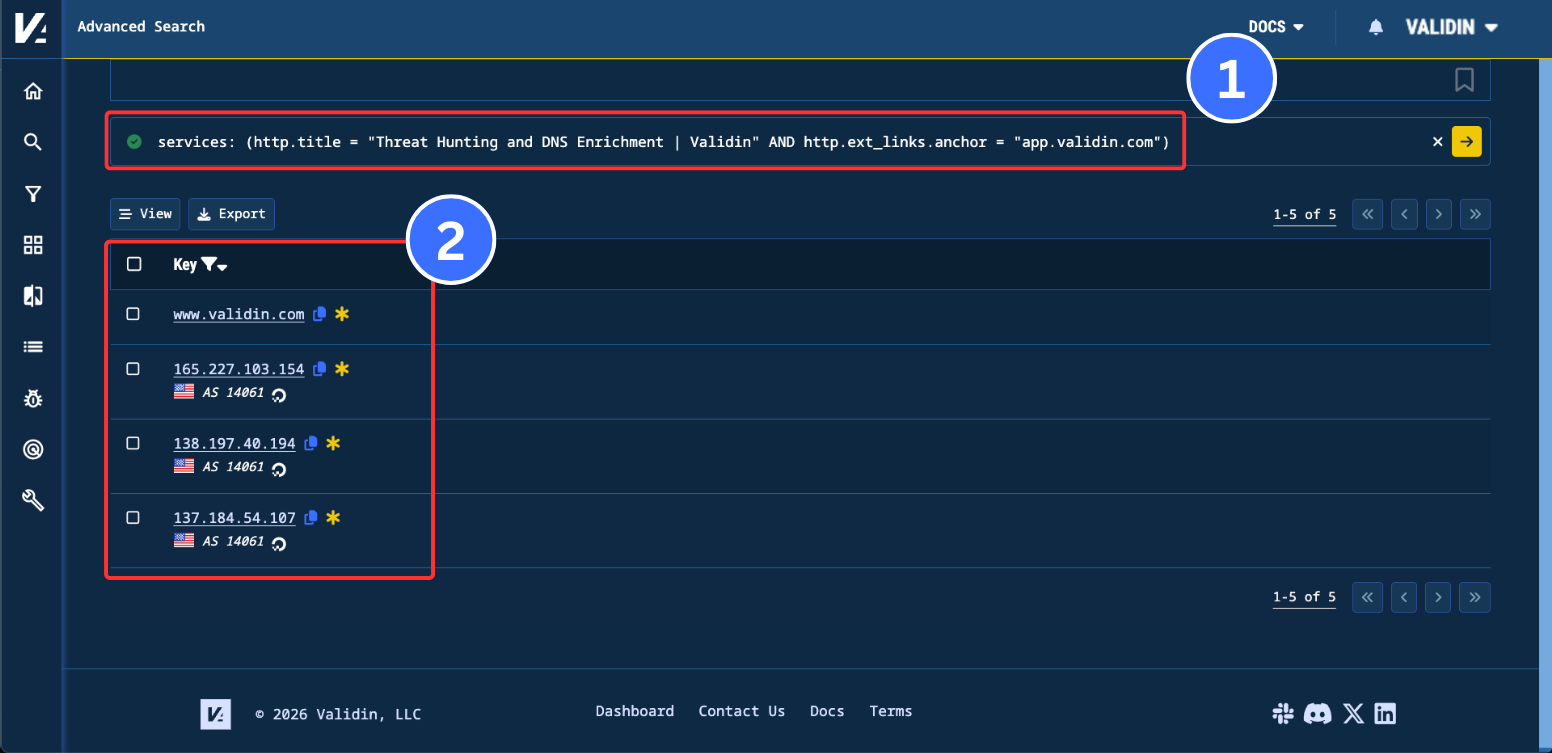
Figure 1. A completed title tag and anchor link advanced query with domains and IPs returned as results.
Once searched, Validin will return all domains and IPs within its host response dataset that match the above conditions.
Grouped Conditions Must Match Within the Same Observation Window
Within a single group prefix, all conditions are evaluated against the same observation window. In the example above, the returned indicators must have contained both the matching title tag and the matching anchor link in the same observed response. Validin does not return indicators where the title appeared in one response and the anchor appeared in a separate response. This behavior helps reduce false positives when analysts are matching page content, service metadata, or other time-bound observations.
Query Construction & Validation Improvements
The new interface includes:
- Autocomplete for fields and values
- Real-time syntax validation
- Inline guidance to reduce query errors
These features reduce friction in constructing complex queries and improve iteration speed during investigations.
Suggested Quick Pivots
We’ve been using the new Advanced Search feature internally for our own threat hunting and have found it particularly useful for nameservers and registration pivots. We’ve codified these into suggested “Quick Pivots” options within Validin’s global search. These allow analysts to identify and quickly construct advanced queries for cases where there’s enough information to construct these queries. Quick pivots are available in the summary, resolution and registration tabs of our global search page and are marked by a dropdown menu labeled “Quick Pivots”.
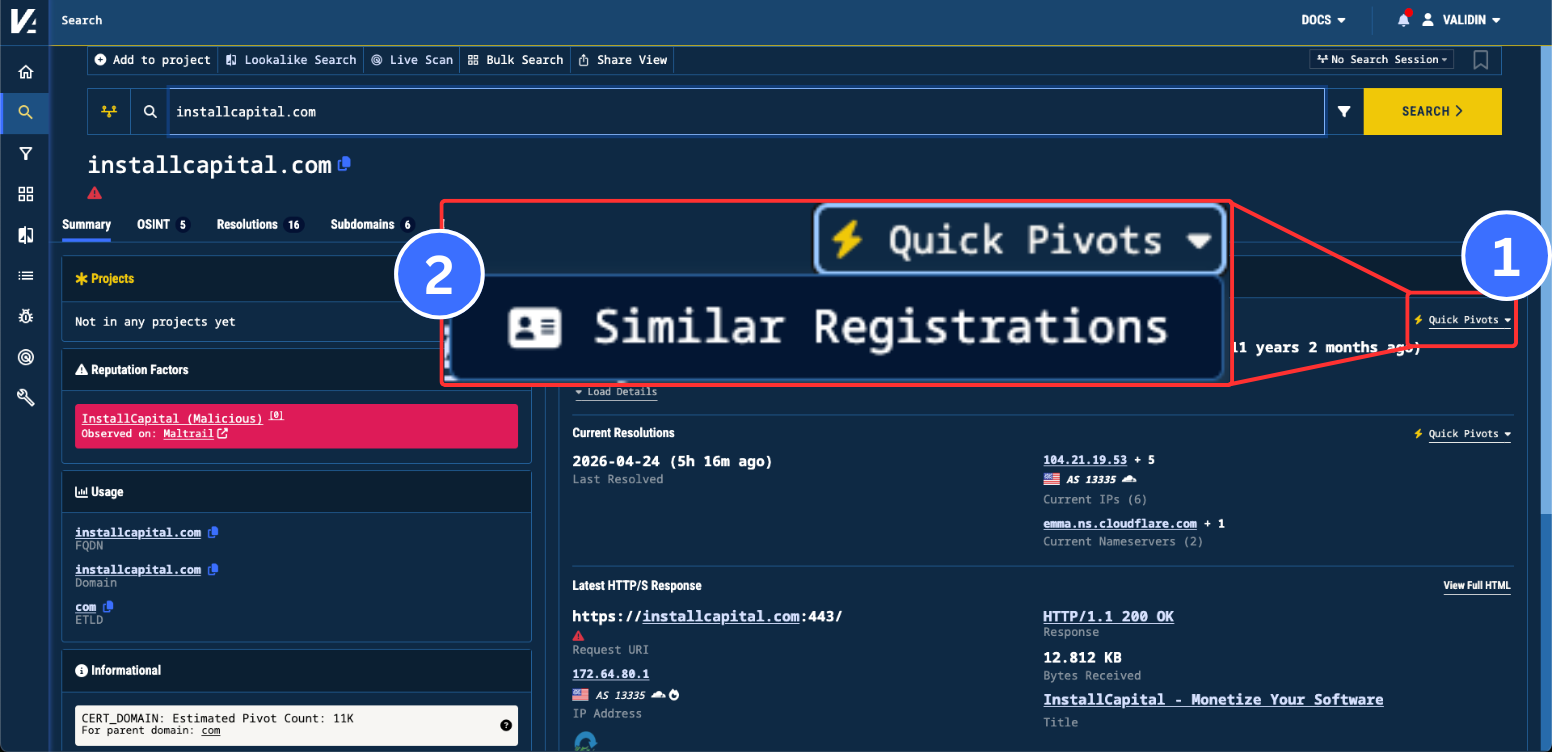
Figure 2. The Quick Pivots dropdown menu on the summary page with the Similar Registrations option.
Selecting the “Similar Registrations” option from the dropdown menu will pre-populate and search the following query in our Advanced Search:
registration: (registrar = "NameCheap, Inc." AND registered = "2015-02-04T18:06:26Z~30m" AND ns = "brad.ns.cloudflare.com" AND ns = "emma.ns.cloudflare.com")
We’ve found this query especially helpful for identifying domains with similar registration patterns. Keep an eye out for when a Quick Pivot is available; we’ll continue adding them to the platform as we develop them. If you’d like to suggest one, feel free to email us at contact@validin.com.
Search Sessions and Pivot History
As part of a broader set of search improvements, we are updating the Pivot History view, and introducing Search Sessions. Search Sessions are available in the top-right of the search page, and allow you to track your search history in related Search Sessions. Start a new session, and all subsequent searches will be linked to that session. This allows you to revisit sessions, and trace exactly how you pivoted between indicators.
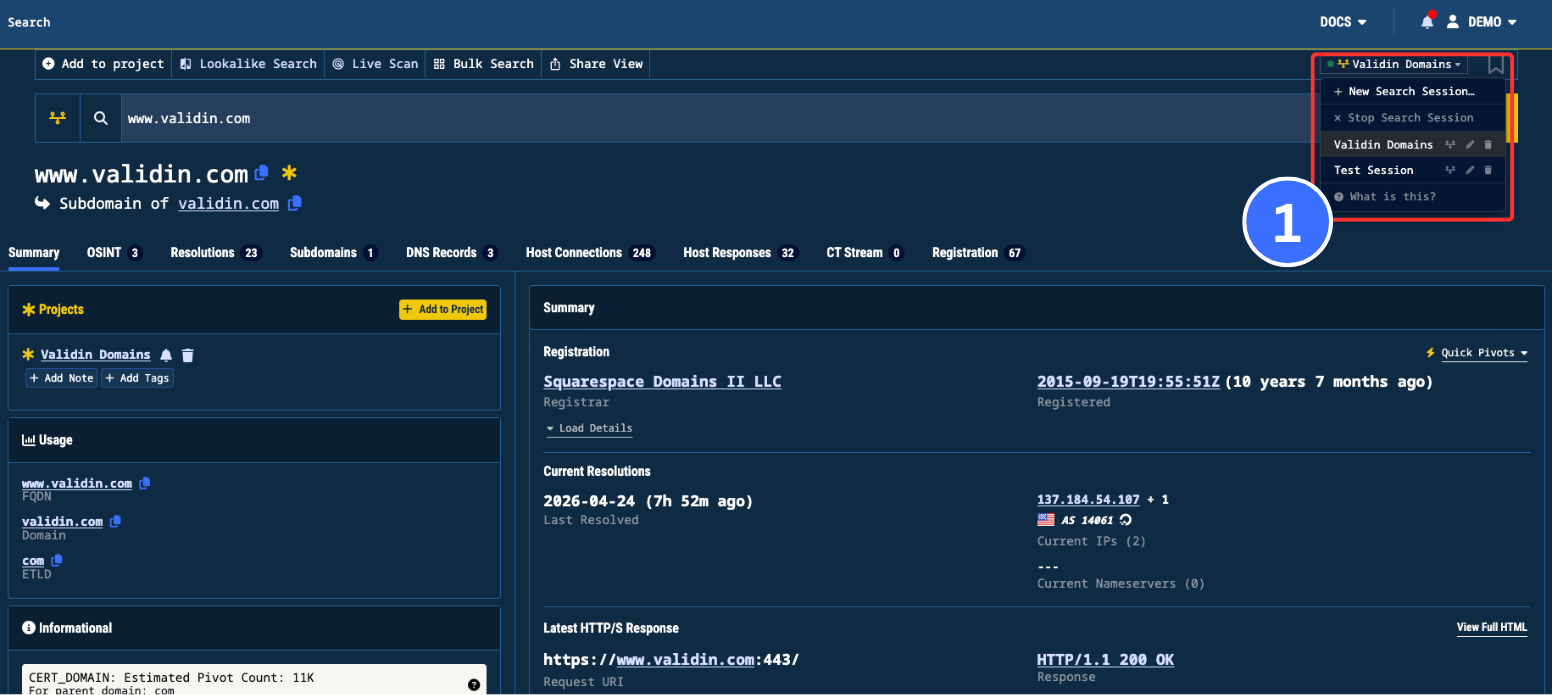
Figure 3. Start, stop, and select a Search Session through the dropdown on the top-right of the search page.
We have also improved the existing view for your Pivot History, and added additional ways to interact with it. Click the timeline icon to the left of the search bar to view your Pivot History. You can see your standard Pivot History for a particular indicator as a tree on this tab.
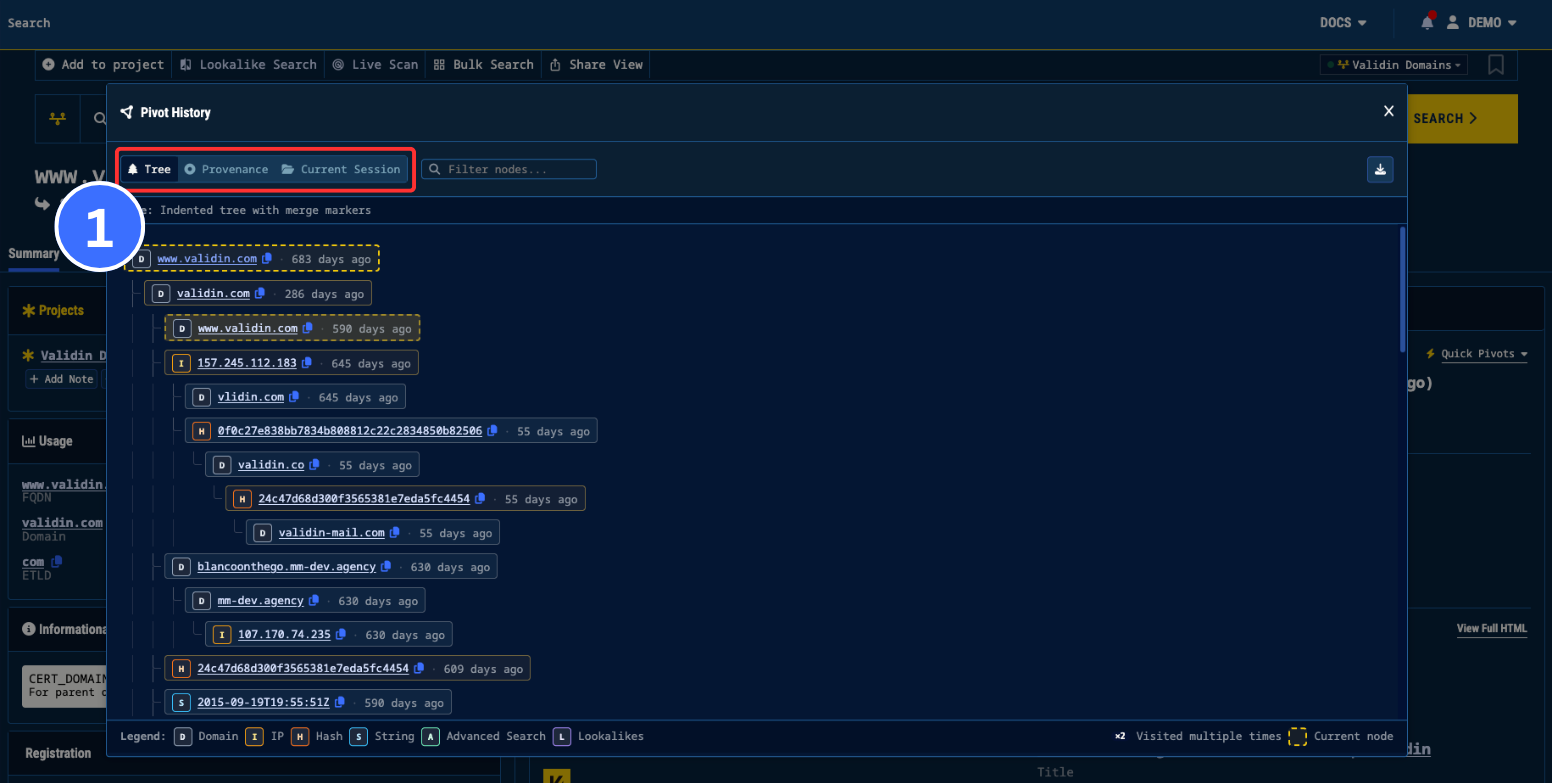
Figure 4. View your Pivot History through the yellow timeline button on the left of the search bar.
You can also use the new provenance view to trace how you arrived at a particular indicator and which related nodes led to it.
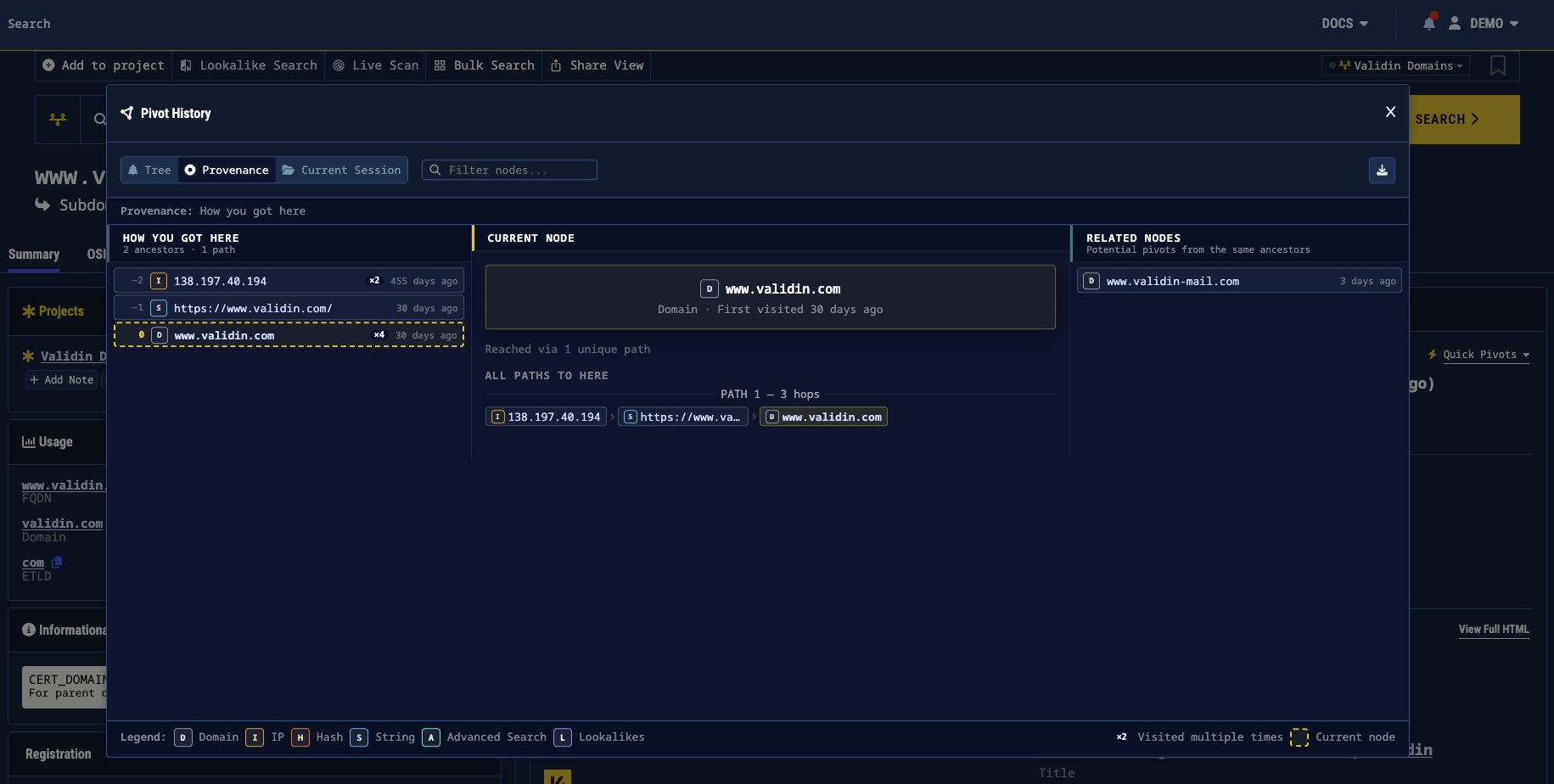
Figure 5. An example provenance view for how you arrived at a particular indicator.
Conclusion
VQL gives analysts a more precise way to search services, DNS, and registration data from a single interface. With autocomplete, validation, same-observation matching, and Quick Pivots, analysts can move from an initial indicator to related infrastructure with fewer manual steps. We’ll continue expanding VQL data source coverage and pivots throughout the coming months.